 Circuit Creation
LCD display Project
Components Required
- Arduino Uno
- 16x2 LCD Display
- 10kΩ Potentiometer
- 220Ω Resistor
- Breadboard
- Jumper Wires
- USB Cable
Description
The LCD (Liquid Crystal Display) project allows you to display text and numbers on a screen using Arduino. This is a fundamental skill for creating user interfaces and showing sensor data in real-time on any Arduino project.
Watch Video
Watch on YouTubeArduino Code
/*
    Project: LCD Display Project using Arduino
    description: Learn how to interface a 16x2 LCD display with an Arduino Uno.

   Components:
     -  Arduino Uno
     -  16x2 LCD Display
     -  10kΩ Potentiometer
     -  220Ω Resistor
     -  Breadboard and Jumper Wires
     -  USB Cable
   Author: Circuit Creation RN

*/

// This code will display "Hello World" on the LCD screen when the Arduino is powered on.

// Include the LiquidCrystal library
#include

// Initialize the library with LCD pin numbers
LiquidCrystal lcd(12, 11, 5, 4, 3, 2);

void setup() {
  // Set up the LCD's number of columns and rows
  lcd.begin(16, 2);

  // Print "Hello World" on the first row
  lcd.print("Hello World");
}

void loop() {
  // Nothing to do, just display the message
}
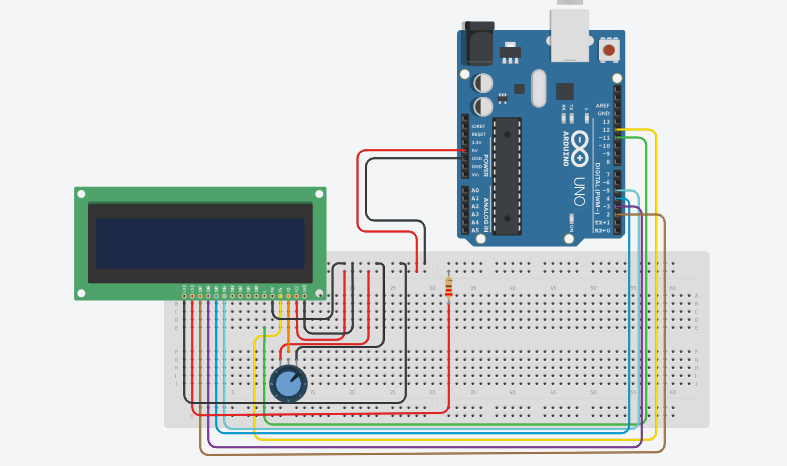
Circuit Diagram
Download Diagram